Security report
BYD Shark 6 Cybersecurity Report – What ADB Owners Should Know

The key distinction
ABC’s Four Corners investigation aired on 21 September 2026. For owners interested in Android Debug Bridge (ADB), the important question is not simply whether the vehicle was described as “hacked”, but what access was established and which capabilities followed from it. [3]
Our assessment is that owners should avoid two equally unhelpful conclusions: that the demonstration makes every use of ADB equivalent to taking control of a vehicle, or that its physical-access requirements make the security concerns irrelevant.
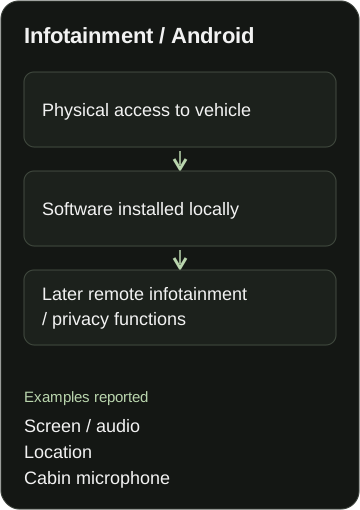
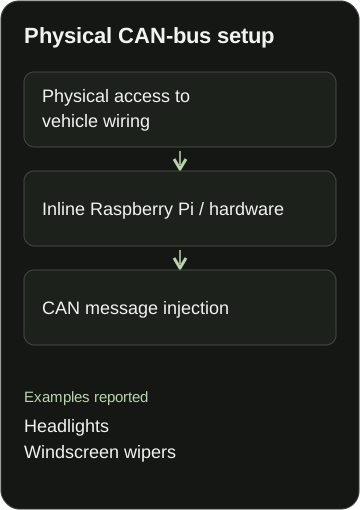
Two distinct technical paths in the Shark 6 demonstration
Both involved physical preparation, but they relied on different forms of access and demonstrated different capabilities.
Infotainment / Android
- Physical access to vehicle
- Software installed locally
- Later remote infotainment / privacy functions
Examples reported: Screen / audio, Location, Cabin microphone.
Physical CAN-bus setup
- Physical access to vehicle wiring
- Inline Raspberry Pi / hardware
- CAN message injection
Examples reported: Headlights, Windscreen wipers.
What the researchers demonstrated
Fortify’s account describes physical installation of head-unit software, followed by remote operation. It calls the access unprivileged: firmware was not modified and privilege escalation was not attempted. Separately, an inline Raspberry Pi connected to physically tapped CAN wiring sent messages to operate headlights and wipers. The researchers removed the vehicle’s telematics SIM and connected it through their own hotspot rather than relying on the vehicle’s normal telematics connection. [1]
ABC reported screen/audio interference, live location tracking and cabin-microphone access. Its online report says the researcher could not access brakes or cameras; the broadcast also says he could not tamper with steering. These describe the limits of this demonstration, not proof that those systems are invulnerable. [2] [3]
Fortify credited SELinux/QNX isolation with protecting cameras, without testing hypothetical privilege escalation. [1]
The broadcast itself referred to physically tapping the CAN bus. There is therefore no need to describe that preparation as something ABC concealed. The useful task is to distinguish the separate mechanisms, not dismiss the reporting. [3]
Infotainment access and the physically connected CAN demonstration should not be presented as interchangeable.
What BYD has said
In a statement reproduced on 1 October, BYD said its engineers replicated the ADB-enablement defect and installation of an untrusted app. It reported that location and microphone requests required manual approval through the infotainment interface. [4]
BYD described a future, validated Shark 6 OTA to remove the identified user-interface activation mechanism, while assessing whether other Australian models need changes. It also announced a separate CAN-security assessment. [4]
As of 6 October 2026, this review has not verified a released security-patch build or confirmed rollout. The statement describes planned remediation, not a release certificate. A missing public confirmation is not proof that no vehicle has received an update. [4] research-status observation
What this means for an ADB owner
A useful interface is still a security-sensitive interface
Android documents ADB as a development and diagnostic tool capable of installing applications and running shell commands. Calling it a tool rather than malware is accurate, but that does not make every use of it safe. The relevant questions are who can use it, what they install and which capabilities the installed software receives. [5]
Different approvals protect different things
Enabling a debugging interface, authorising a computer and granting an application permission are different decisions. Android’s documentation describes debugging-host approval and app-permission controls separately. Owners should not assume that every operation carried out through ADB will produce a new on-screen warning. [5] [6]
A manually approved request also does not establish who approved it or whether the vehicle owner gave informed consent. That is an important limitation of what can be concluded from the reported permission prompts, rather than a claim that the researchers used an undisclosed permission technique. [4] interpretation
Our recommendation is to treat brief physical access seriously, while keeping it distinct from an internet-only attack. The need to touch a vehicle first changes the threat being demonstrated; it does not, by itself, make later misuse harmless.
No rooting is not a promise of no privacy risk
Microphone and location access can be sensitive even when software operates through ordinary permission mechanisms. The sensible question is whether an app genuinely needs the access requested, rather than whether someone has described the installation as “root-free”. [6] security interpretation
Do not generalise across models or software builds
This report does not establish that BAOLAB’s normally supported configurations are the subject of the announced Shark 6 fix. Equally, it would be premature to promise that all other configurations will remain unaffected. BAOLAB’s position is to assess compatibility for the actual vehicle and installed software, not infer it from a model name alone. [4] [9] assessment
Responsible ADB use
Keep software current. Follow manufacturer security-update instructions. Do not postpone a security update solely to preserve an aftermarket feature. Australian Cyber Security Centre guidance recommends updates because they address security weaknesses; loss of a convenience feature is not a reason to describe an identified weakness as desirable. [8] BAOLAB recommendation
Be selective about applications and permissions. Obtain software from a source you can identify and have reason to trust. Review permissions, question access unrelated to an app’s purpose and remove software you no longer trust. A familiar-looking filename or an installation without an error is not, by itself, a security assessment. These are our recommendations, not a claim that any particular third-party package has been audited. [6] BAOLAB recommendation
Use trusted networks and verify the debugging mode. AOSP distinguishes legacy TCP ADB, which is unencrypted, from newer paired wireless debugging that uses TLS. “Wireless ADB” alone is therefore not a sufficient description of its security. We recommend private, trusted networks, no internet-facing debugging-port forwarding, and checking the actual configuration instead of assuming encryption or host authentication. [7] BAOLAB recommendation
Approve only connections you intend to authorise. Reject unfamiliar debugging requests where that approval feature exists. Do not assume every vehicle implements the same prompts as a standard Android phone. Where supported, remove obsolete computer authorisations and disable unneeded debugging access after use. [5] [7] BAOLAB recommendation
Distinguish disconnecting a tool from removing an app. Disabling ADB should not be treated as uninstalling software or revoking an app’s existing permissions. Android treats application management and debugging connections as separate functions. Suspected unwanted software needs its own assessment; a debugging toggle is not a complete clean-up procedure. [5] [6] interpretation
What to check when an OTA arrives
For compatibility support, we recommend recording the software/build identifier and relevant symptoms before and after an update, without collecting unnecessary personal information.
Three questions should be checked separately:
- Can ADB be enabled after the update?
- Is previously enabled ADB access still available after the update?
- Do previously installed applications still function after the update?
A change to one does not logically settle the others. Reports about a helper app or an enablement method should be evaluated against the exact configuration tested, not treated as universal promises.
BAOLAB’s published terms recognise configuration-dependent persistence and manufacturer changes. They do not guarantee permanent access or the ability to overcome every future change. The terms applicable to a customer’s purchase govern any support benefit; this article does not replace them. [9]
BAOLAB’s scope and independence
BAOLAB provides independent, owner-requested remote technical assistance for ADB enablement on compatible BYD and Denza infotainment systems. Our service is limited to infotainment configuration. It does not include rooting, firmware modification, CAN-bus modification, or alteration of braking, steering, battery, drivetrain or safety hardware. [9]
BAOLAB is an independent aftermarket provider and is not affiliated with, endorsed by, sponsored by, authorised by, or acting on behalf of BYD or Denza. [9]
Those boundaries explain what we provide; they are not a guarantee that third-party software or an enabled debugging interface carries no risk. Our recommendation is informed, owner-authorised use, with security updates and privacy treated as priorities rather than obstacles.
Sources
All sources were checked on 6 October 2026. Dates below are publication dates unless identified otherwise.
- Source 1: Fortify Labs, 28 September 2026. Technical clarification of the Shark 6 demonstration. First-person methodology; not an independent replication.
- Source 2: ABC News, Angus Grigg, 21 September 2026. Original eyewitness report.
- Source 3: ABC Four Corners, 21 September 2026. Broadcast and published transcript: Asleep at the Wheel.
- Source 4: BYD Australia statement, reproduced by Torquecafe on 1 October 2026. Full statement within the article. The source is the embedded manufacturer statement, not the surrounding editorial summary. A separate original BYD-hosted release was not located in this review.
- Source 5: Android Developers. Android Debug Bridge documentation. Last updated 25 September 2026. General Android documentation, not confirmation of every BYD implementation.
- Source 6: Android Developers. Runtime-permission documentation. Last updated 1 October 2026.
- Source 7: Android Open Source Project. ADB Wi-Fi architecture. Undated living technical documentation.
- Source 8: Australian Cyber Security Centre. Device-update guidance. Publication date not displayed in the retrieved page.
- Source 9: BAOLAB. Terms and Conditions, Version 2.0, effective 6 October 2026; Shopify rendering. Business scope and policy statements, not independent security certification.