
The Denza B5 and B8's infotainment system runs on Android. That's no secret — the 17.3-inch screen, the app drawer, the settings menu, it's all Android under the hood. What most people don't know is that you can sideload apps onto it, opening up a whole world of functionality that BYD didn't include from the factory.
What is Sideloading?
Sideloading means installing apps from outside the official app store — basically loading APK files directly onto the system. On a phone, this is common. On a car's infotainment system, it's a bit more involved, but the Denza's Android base makes it possible.
What We Installed
After enabling ADB (Android Debug Bridge) access on our B8, we sideloaded several apps:
Sentry Mode
The Denza B5 and B8 don't come with a built-in sentry mode like Tesla. But with the right app, you can use the car's existing cameras as a surveillance system. When parked, the cameras detect motion around the vehicle and start recording. If someone gets too close or the car detects strong vibrations, it can flash the hazard lights or even honk the horn to scare them off — and you get a notification on your phone.
This is probably the most useful sideloaded app — in a busy carpark, it's peace of mind that your Denza is watching.
▲ Sentry mode demo — how it works
▲ Sentry mode in action — motion detection + hazard light alerts
Quad-View Dashcam
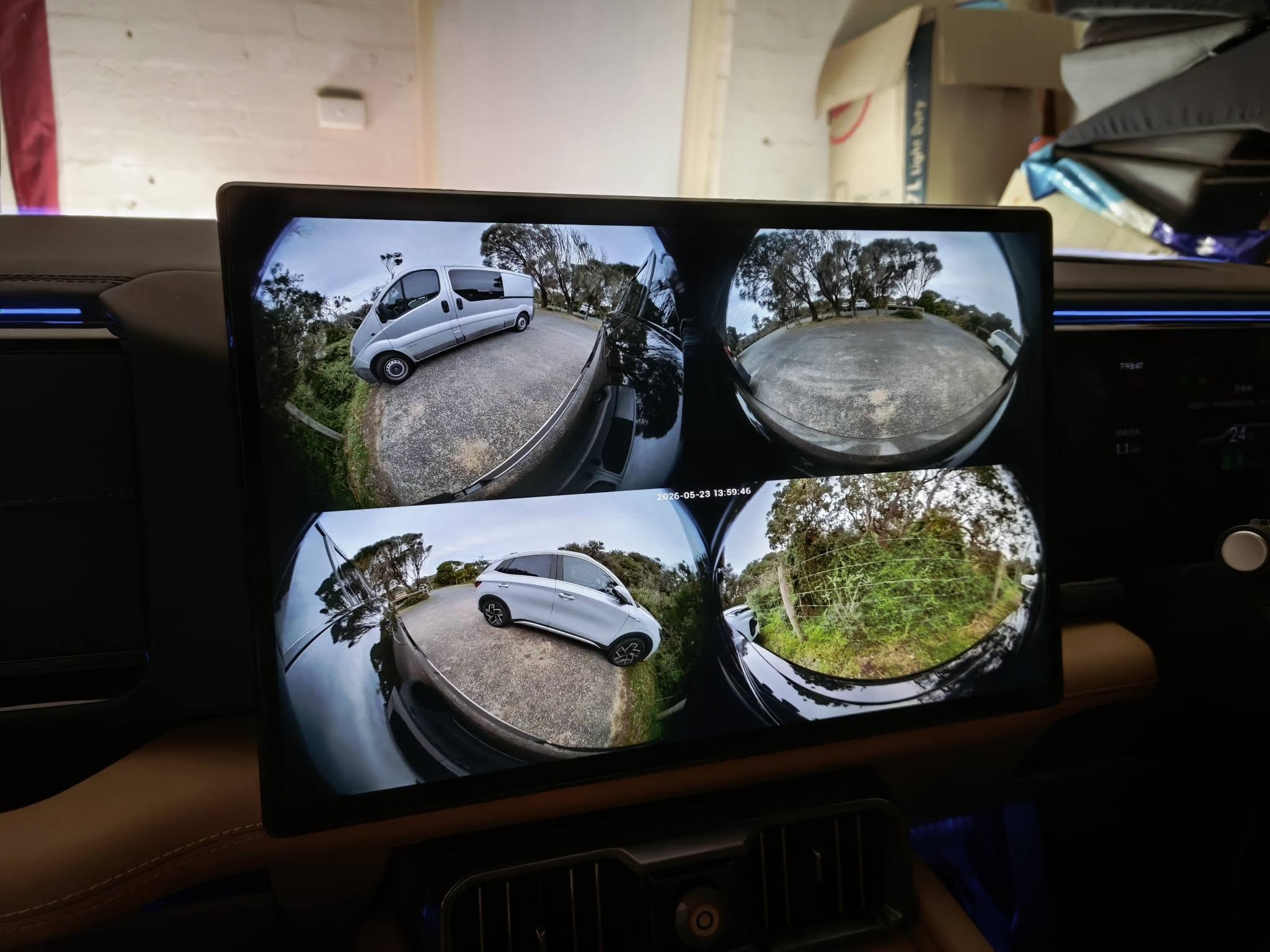
Neither the B5 nor the B8 comes with a built-in dashcam from the factory. Most owners end up spending hundreds on an aftermarket unit with ugly cables dangling across the windshield. But the Denza already has cameras everywhere — front, left, right, and rear.
Our quad-view dashcam app uses the car's 360° camera system to record while driving, with a clean overlay showing timestamp, speed, and brake/accelerator pedal position as watermarks. You get four simultaneous camera angles — front, left, right, and rear — all viewable on the 17.3-inch screen. No aftermarket hardware, no cables, no fuss.
▲ Quad-view dashcam — 360° recording while driving
Entertainment & Connectivity
We also installed a few entertainment and connectivity apps. Video streaming apps like TikTok work while the car is in motion (for passengers, of course), and the large screen makes them surprisingly usable — especially with the B8's 6-seat layout where rear passengers can comfortably watch while parked or charging.
One of the best additions is Baidu CarLink — the "CarPlay equivalent" for Chinese phones. If you're using an Oppo, Vivo, Xiaomi, OnePlus, or any other Chinese-brand phone, Baidu CarLink connects wirelessly the moment you start the car, just like wireless Apple CarPlay. No cables, no pairing menus, it just works.
How It Works
ADB must first be enabled through switches inside the vehicle's factory menu. Once it is enabled, compatible apps can be installed with standard Android ADB tools in two ways:
- Wired: Connect an Android phone or laptop via USB and use standard Android ADB tools to install APKs
- Wireless: Enable wireless debugging and install apps remotely from a PC, laptop, or even an Android phone using a wireless ADB assistant app — no cables needed
BAOLAB's service covers ADB enablement. Third-party app installation is separate unless it is included in the support tier purchased.
Does It Affect Warranty?
Enabling ADB and installing third-party software may affect warranty decisions, servicing, or support outcomes. Ask your dealer before proceeding if this concerns you. BAOLAB is an independent aftermarket business and is not affiliated with or endorsed by BYD or Denza.
Want This on Your Denza?
We offer remote ADB enablement assistance for compatible BYD Group vehicles. View the ADB Enablement Service for pricing and inclusions. Not sure about your vehicle? Run the 60-second QR check →
Watch our demos: Sentry Mode | Quad-View Dashcam